


Next: Lab 3 Up: EEE 407/591 - Digital Previous: Part 2: Discrete Time Main: Main Lab Page
Next: Lab 3
Up: EEE 407/591 - Digital
Previous: Part 2: Discrete Time
Main:
Main Lab Page
The objective of this lab is to provide hands-on experiences on z-domain representations of Signals and LTI systems and to expose students to relationships of pole/zero locations with the frequency response. Once the relationship between the pole-zero plot and magnitude response is understood, a filter with a desired magnitude response can be designed by appropriately placing its poles and zeros in the Z-plane. Finally, a system in which the effects of the poles and zeros cancel each other will be examined.
For each problem you should save the required graphs in gif format. Make a note of the filter coefficients that you use in each problem so you can answer the questions at the end of this lab. It may be a good idea to look at the quiz for this lab before getting started to know what is required.
For this lab, you are required to use a new Java progam called J-DSP. To become familiar with it, we recommend that you first work through the Introduction on J-DSP.
The z-transform of the impulse response of a LTI system can be written in the following form:

This is also known as the transfer function of the system. The ai's
and the bi's are called the filter coefficients of the system with a0
always being equal to one. To create an LTI system with J-DSP, first, determine
the z-transform of the system's impulse response h[n] and then
determine the filter coefficients from this z-domain function and enter them
into a coefficient block in the
J-DSP program. If the input to a filter block is x[n], then the
output will be

where * denotes convolution. If the input to the filter block is an impulse, the output will be the inverse z-transform of the transfer function, i.e., h[n]. Besides the filter block, other J-DSP blocks that will be useful to you in this lab include the Signal Generator Block, the coeff. block, the plot block , the FFT block, the PZ placement block, the Freq-Resp block. For all frequency responses in this lab, you can either use a Fast Fourier Transform of size 256 on the time domain impulse response of the filter followed by a plot block to visualize the response in the frequency domain or you can directly use Freq-Resp block in conjunction with the coefficients block to visualize the frequency response. Use linear scaling of the plot if it is not stated otherwise.
You can get the usage of each block from the help dialog box provided in each block interface. Here we are providing the descriptions of three blocks those can be found in "Filter Blocks" menu in the "EXISTING FUNCTIONS" list of J-DSP editor.
 The PZ Placement.
This block can be used to create a pole-zero plot. The PZ Placement block can
be connected to either the bottom of a filter block or to a Freq-Resp block.
Connecting the PZ Placement block to the bottom of a filter block will
automatically set the filter coefficients of that filter block so that its
poles and zeros are at the locations specified in the PZ Placement block.
Connecting the PZ Placement block to a Freq-Resp block will display, in the
Freq-Resp window, the frequency response of the filter having poles and zeros
specified in the PZ Placement block.
The PZ Placement.
This block can be used to create a pole-zero plot. The PZ Placement block can
be connected to either the bottom of a filter block or to a Freq-Resp block.
Connecting the PZ Placement block to the bottom of a filter block will
automatically set the filter coefficients of that filter block so that its
poles and zeros are at the locations specified in the PZ Placement block.
Connecting the PZ Placement block to a Freq-Resp block will display, in the
Freq-Resp window, the frequency response of the filter having poles and zeros
specified in the PZ Placement block.
Poles and zeros can be placed on the plot by using either the mouse or the keyboard. To place them using the mouse, select "graphical" from the pop-down menu, press the "Add Pole" or "Add Zero" button and then click on the plot in the desired location of the zero or pole. To place poles and zeros using the keyboard, select one of the manual options from the pop-down menu, choose either the pole or zero radio button, enter the location using the keyboard and press the enter button on the right edge of the window. Please note that because of the graphical interface the positions of poles and zeros are on a grid and hence the entered values may change according to the grid values If you want to avoid changes in manually entered roots, then avoid switching from manual to graphical and vice versa. To delete pole(s) or zero(s), select the pole(s) or zero(s) to be deleted on the plot by clicking on it and then press the delete button at the bottom of the window. To move a pole or zero, click on the pole(s) or zero(s) in the plot and while holding the mouse button down drag it to a new location. The reset button will erase all the poles and zeros from the plot.
The Freq-Resp block.
The Freq-Resp block can be connected to the top of a filter block, to a PZ
Placement block as explained above, or to a filter design block such as IIR
Fltr, FIR Fltr or Kaiser. The Freq-Resp block will show the frequency response
of the filter to which it is connected or if connected to the PZ Placement
block, the frequency response of a filter having poles and zeros specified in
the PZ Placement block.
The PZ-Plot block.
Connect the PZ-Plot block to the top of a filter block to see a plot of the
poles and zeros of that filter or to any of the filter design blocks to see a
plot of their poles and zeros. The filter design blocks include FIR Design, IIR
Design, Kaiser Design, Parks-McClellan, Freq. Sampling, LMS.
For this lab, use the J-DSP program.Click the link below
Problem 1: Exponential Sequences
(a) Design and simulate a digital filter that has the impulse response

Save the block diagram of your system as graph1.gif
Obtain graphs of the following using JDSP:
- The impulse response (Save the impulse response as graph2.gif)
- The magnitude of the frequency response on a linear scale. Use the Fast Fourier Transform (FFT) of size 256.
(Save the magnitude response as graph3.gif)
(b) Redo (a) for

(Save impulse response as graph4.gif)
(Save magnitude response plotted on a linear scale as graph5.gif)
Problem 2: Digital Oscillator
Design and simulate a digital oscillator where the impulse response has the form

with

Obtain a graph of the frequency response using a linear scale. (Save the graph as graph6.gif)
Problem 3:
Consider a system whose impulse response is:

The input signal to the system is

Do the following which will include 3 graphs.
(i) Simulate y[n] = x[n]*h[n] when
 . To generate x[n], open
the signal generator block. Set the signal to a sinusoid with frequency
0.25, pulsewidth 256 and gain 1. Save the plot of y[n] as
graph7.gif
. To generate x[n], open
the signal generator block. Set the signal to a sinusoid with frequency
0.25, pulsewidth 256 and gain 1. Save the plot of y[n] as
graph7.gif
(ii) Simulate y[n] = x[n]*h[n] when
 . To generate x[n], set the frequency to 0.5 and the
pulsewidth to 256. Save the plot of y[n] as
graph8.gif
. To generate x[n], set the frequency to 0.5 and the
pulsewidth to 256. Save the plot of y[n] as
graph8.gif
(iii) Plot the frequency response using a linear scale and save
the plot of the frequency response as graph9.gif
(iv) State the reasons for the behavior of this system.
Problem 4: Pole-Zero Plots
The figure below shows the pole-zero configuration of two causal linear
time-invariant systems.


Do the following:
(i) Determine Ha(z), the system function for the pole-zero plot in figure a.
(ii) Obtain the impulse response of system (a) by simulation. (Save impulse resp. as graph10.gif)
(iii) Determine the response of system (a) to a triangular input signal with amplitude 1 and length 12 samples. (Save the output as graph11.gif)
(iv) Determine Hb(z), the system function for the pole-zero plot in figure b.
(v) Obtain the impulse response of system (b) by simulation. (Save the impulse resp. as graph12.gif)
(vi) Determine the response of system (b) to a triangular input signal with amplitude 1 and length 12 samples. (Save the output as graph13.gif)
Problem 5: Cascaded and Parallel Configurations of Systems
(a) Consider the following sequence, y[n], which is the convolution of two
casual sequences.

(i) Create a system using two filter blocks such that the impulse response of the system is y[n] given above. Use a=0.5 and b=0.25. Plot the impulse response of the system.(Save impulse response as graph14.gif) Save the block diagram of the system as graph15.gif.
(ii) Now create a system using only one filter block such that the impulse response is also y[n]. Again use a=0.5 and b=0.25. Verify that the impulse response of this system is the same as the impulse response of the system in the previous part.
(b) Consider a system that has the following impulse response:

(i) Implement the system using two filter blocks and one add block. Plot the impulse response (Save the impulse response as graph16.gif) and the block diagram of the system as graph17.gif.
(ii) Implement the same system using only one filter block. Verify that the impulse response is the same as that of the system in the previous part.
In all problems, with the exception of number 3, use linear scaling for the magnitude.
Problem
6: Pole-Zero Plots
Find the poles and zeros of the following transfer functions. Use the PZ Placement block in J-DSP to place the poles and zeros and the Freq-Resp block to view the system's frequency response. Plot the frequency response of each one using linear scaling.
(a) Plot the frequency response of this system and save the
plot as graph18.gif

(b) Plot the frequency response of this system and save the
plot as graph19.gif

Problem 7: Varying the magnitude of poles and zeros.
Consider a system which has poles at

and a zero at

where
(i) r = 0.96
(ii) r = 0.71
(iii) r = 0.14
(a) Derive analytically the impulse response of the system and show its dependence on r. Sketch the impulse response for r=0.96 using J-DSP. Save the plot of the impulse response as graph20.gif
(b) Plot the frequency and phase response for case (i) Use linear scaling. Save the plot as graph21.gif.
(c) Plot the frequency and phase response for case (ii) Use linear scaling.Save the plot as graph22.gif
(d) Plot the frequency and phase response for case (iii) Use linear scaling. Save the plot as graph23.gif
(e) Observe the differences in the the three plots.
Problem 8: Lowpass Filter/ Highpass Filter Design by Pole-Zero
Placement
For this problem, you will design filters by pole and zero placement using J-DSP's PZ Placement block. You may want to use the following set-up to do the design.
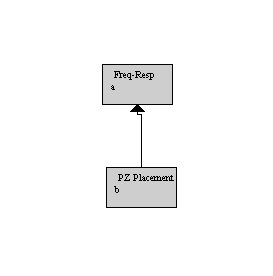
Double click on the PZ Placement and then Freq-Resp block so you can see each block's respective window at the same time. Place the poles and zeros on the pole-zero plot at the desired locations. When all poles and zeros have been placed, move the poles and zeros around by clicking them and dragging them to new locations. As you move the poles and zeros, the frequency response will be immediately updated. Adjust the location of the poles and zeros until the desired response is obtained.
For this problem, plot the magnitude responses in decibels.
(a) Design a lowpass filter using pole-zero placement
with approximate cutoff frequency
 at 3 dB
point. Use three sets of zeros and two sets of poles. Plot of the frequency
response using a decibel scale and save the plot as graph24.gif.
at 3 dB
point. Use three sets of zeros and two sets of poles. Plot of the frequency
response using a decibel scale and save the plot as graph24.gif.
(b) Design a highpass filter using pole-zero placement
with an approximate cutoff frequency of
 at 3 dB
point. Use two sets of zeros and five sets of poles. Plot the frequency
response using a decibel scale and save the plot as graph25.gif.
at 3 dB
point. Use two sets of zeros and five sets of poles. Plot the frequency
response using a decibel scale and save the plot as graph25.gif.
Problem 9: An interesting frequency response
Consider the following system:

(a) Find the poles and zeros of the transfer function.
(b) Plot the frequency and phase response of the system on a linear scale. Save the plot as graph26.gif.
(c) Examine the frequency and phase response.
Next: Lab 3
Up: EEE 407/591 - Digital
Previous: Part 2: Discrete Time
Main:
Main Lab Page
Copyright 2004 Andreas Spanias, MIDL, Arizona State University JDSP and Report Submission Software Developed by ASU-MIDL For questions contact Prof. Spanias spanias@asu.edu.