


This exercise analyzes how the magnitude and phase of a pole or zero influences the sytem's magnitude response. It will first explore the relationship between the pole-zero plot and the magnitude response of a system. Once this relationship is understood, a filter with a desired magnitude response can be designed by strategically placing its poles and zeros. Finally, a system in which the effects of the poles and zeros cancel each other out will be examined.
Use the J-DSP program to do this exercise. Before starting, become familiar with the following three J-DSP blocks as they will be very helpful in doing the problems below. Each of the three can be found under the filter blocks menu.
 The PZ Placement. This block can be used to create a pole-zero
plot. The PZ Placement block can be connected to either the bottom of a filter block or to a Freq-Resp block. Connecting the
PZ Placement block to the bottom of a filter block will automatically set the filter coefficients of that filter block so that its poles and zeros
are at the locations specified in the PZ Placement block. Connecting the PZ
Placement block to a Freq-Resp block will display,
in the Freq-Resp window, the frequency response of the filter having poles and zeros specified in the
PZ Placement block.
The PZ Placement. This block can be used to create a pole-zero
plot. The PZ Placement block can be connected to either the bottom of a filter block or to a Freq-Resp block. Connecting the
PZ Placement block to the bottom of a filter block will automatically set the filter coefficients of that filter block so that its poles and zeros
are at the locations specified in the PZ Placement block. Connecting the PZ
Placement block to a Freq-Resp block will display,
in the Freq-Resp window, the frequency response of the filter having poles and zeros specified in the
PZ Placement block.
Poles and zeros can be placed on the plot by using either the mouse or the keyboard. To place them using the mouse, select "graphical" from the pop-down menu, press the "Add Pole" or "Add Zero" button and then click on the plot in the desired location of the zero or pole. To place poles and zeros using the keyboard, select one of the manual options from the pop-down menu, choose either the pole or zero radio button, enter the location using the keyboard and press the enter button on the right edge of the window. Please note that because of the graphical interface the positions of poles and zeros are on a grid and hence the entered values may change according to the grid values If you want to avoid changes in manually entered roots, then avoid switching from manual to graphical and vice versa. To delete pole(s) or zero(s), select the pole(s) or zero(s) to be deleted on the plot by clicking on it and then press the delete button at the bottom of the window. To move a pole or zero, click on the pole(s) or zero(s) in the plot and while holding the mouse button down drag it to a new location. The reset button will erase all the poles and zeros from the plot.
The Freq-Resp block. The Freq-Resp block can be connected to the top
of a filter block, to a PZ Placement block as explained above, or to a filter design block such as IIR Fltr, FIR Fltr
or Kaiser. The Freq-Resp block will show the frequency response of the filter to which it is connected or if connected
to the PZ Placement block, the frequency response of a filter having poles and zeros specified in the
PZ Placement block.
The PZ-Plot block. Connect the PZ-Plot block to the
top of a filter block to see a plot of the poles and zeros of that filter or to any of the filter design blocks
to see a plot of their poles and zeros. The filter design blocks include FIR
Design, IIR Design, Kaiser Design, Parks-McClellan, Freq. Sampling, LMS.
For this lab, use the J-DSP program.Click the link below.
In all problems, with the exception of number 3, use linear scaling for the magnitude.
Problem 1: Pole-Zero Plots
Find the poles and zeros of the following transfer functions. Use the PZ Placement block in J-DSP to place the poles and zeros and the Freq-Resp block to view the system's frequency response. Plot the frequency response of each one using linear scaling.


Problem 2: Varying the magnitude of poles and zeros.
Consider a system which has poles at

and a zero at

where
Problem 3: Lowpass Filter/ Highpass Filter Design by Pole-Zero Placement
For this problem, you will design filters by pole and zero placement using J-DSP's PZ Placement block. You may want to use the following set-up to do the design.
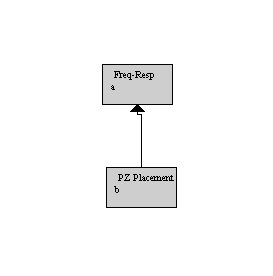
Double click on the PZ Placement and then Freq-Resp block so you can see each block's respective window at the same time. Place the poles and zeros on the pole-zero plot at the desired locations. When all poles and zeros have been placed, move the poles and zeros around by clicking them and dragging them to new locations. As you move the poles and zeros, the frequency response will be immediately updated. Adjust the location of the poles and zeros until the desired response is obtained.
For this problem, plot the magnitude responses in decibels.
 .
Use three sets of zeros and two sets of
poles. Plot of the frequency response using a decibel scale and save the plot as
graph8.gif.
.
Use three sets of zeros and two sets of
poles. Plot of the frequency response using a decibel scale and save the plot as
graph8.gif.
 .
Use two sets of zeros and five sets of poles.
Plot the frequency response using a decibel scale and save the plot as graph9.gif.
.
Use two sets of zeros and five sets of poles.
Plot the frequency response using a decibel scale and save the plot as graph9.gif.
Problem 4: An interesting frequency response
Consider the following system:

Copyright 2003 Andreas Spanias, MIDL, Arizona State University JDSP and Report Submission Software Developed by ASU-MIDL For questions contact Prof. Spanias spanias@asu.edu.